10 Technology Trends Every Small Business Should Know in 2026
Explore 10 important technology trends for small businesses in 2026, including AI, automation, cybersecurity, cloud computing, digital payments and smart business software.
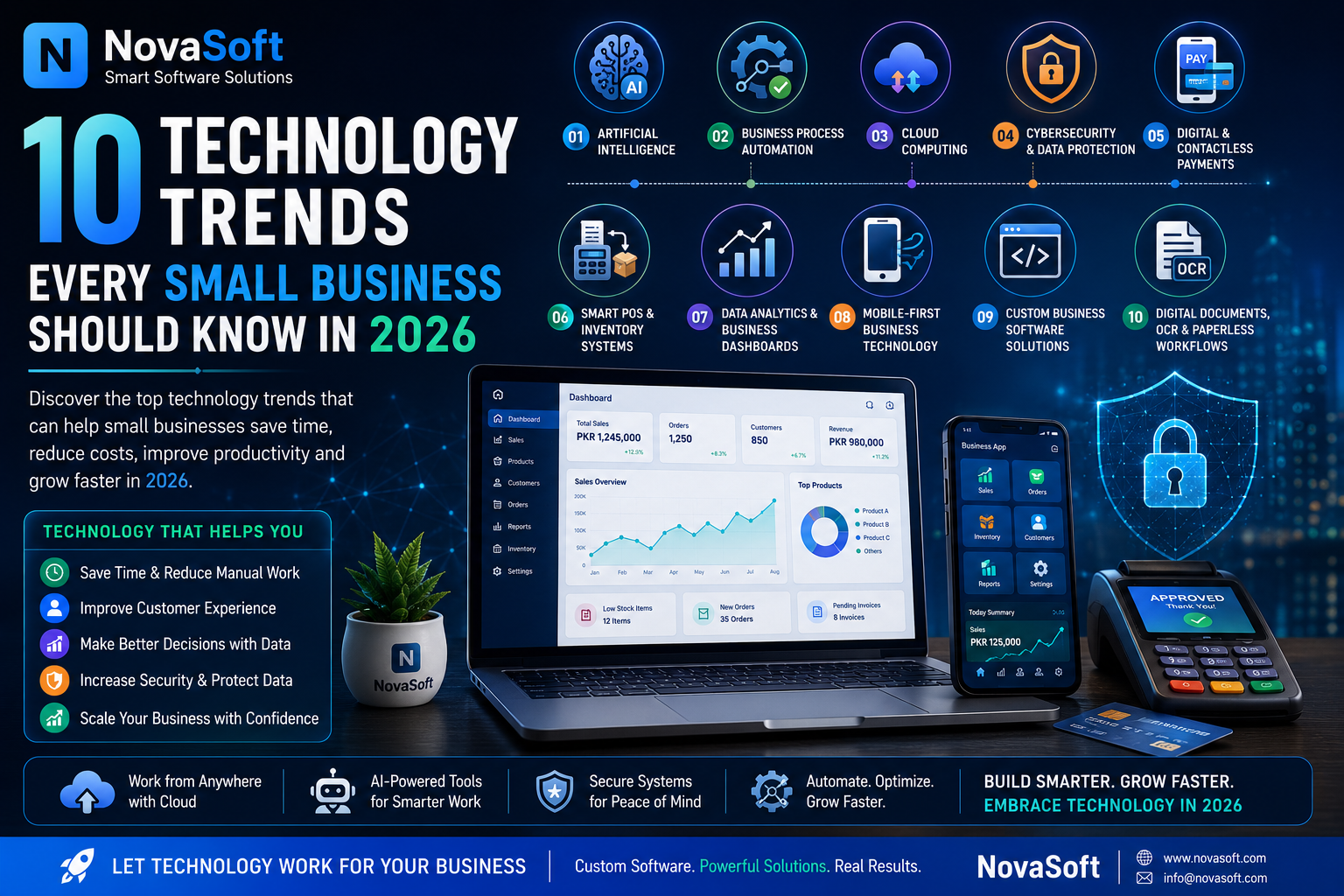
10 Technology Trends Every Small Business Should Know in 2026
Technology is changing the way businesses communicate with customers, manage daily operations and make decisions.
Small businesses no longer need the same technology budgets as large corporations to benefit from modern digital tools. Cloud services, artificial intelligence, automation and business software have made many useful technologies more accessible.
However, businesses should not adopt technology simply because it is popular. The best technology is the technology that solves a real problem, saves time, improves customer experience or helps the business operate more efficiently.
Here are 10 technology trends small businesses should understand in 2026.
1. ARTIFICIAL INTELLIGENCE
Artificial Intelligence continues to become more useful for everyday business tasks.
Businesses can use AI to assist with:
Customer support
Content drafting
Document processing
Data analysis
Product descriptions
Email responses
Business research
Sales assistance
AI can help employees complete repetitive or time-consuming work more efficiently.
However, important information should still be reviewed by a person, especially when it involves customers, finances, policies or business decisions.
AI works best as an assistant rather than a replacement for responsible human decision-making.
2. BUSINESS PROCESS AUTOMATION
Automation allows software to perform repetitive tasks automatically.
For example, instead of manually updating stock after every sale, a POS system can automatically reduce inventory.
Automation can also be used for:
Invoices
Customer notifications
Order processing
Reports
Appointment reminders
Lead management
Low-stock alerts
Email communication
Small improvements in several repetitive processes can save significant time over the long term.
3. CLOUD COMPUTING
Cloud technology allows businesses to access applications, storage and computing resources through internet-connected infrastructure.
Businesses commonly use cloud services for:
Website hosting
Data storage
Backups
Email
Business applications
File sharing
Collaboration
One advantage of cloud infrastructure is scalability.
A business can start with relatively small resources and upgrade as traffic or requirements increase.
However, businesses should still consider security, backups, costs and the reliability of the provider.
4. CYBERSECURITY FOR SMALL BUSINESSES
Cybersecurity is not only a concern for large organizations.
Small businesses may store valuable information such as:
Customer details
Business documents
Passwords
Invoices
Orders
Payment records
Employee information
Basic security practices can significantly reduce risk.
Businesses should consider:
Strong unique passwords
Multi-factor authentication
Regular software updates
Secure backups
HTTPS for websites
Limited administrator access
Employee security awareness
Sensitive information should only be collected when it is actually required.
Security should be considered when systems are being designed, not only after a problem occurs.
5. DIGITAL AND CONTACTLESS PAYMENTS
Customers increasingly expect convenient payment options.
Depending on the country and business, these may include:
Bank transfers
Mobile wallets
Payment gateways
QR payments
Debit or credit cards
Digital invoices
Businesses that sell online may integrate payment services directly with their websites.
When handling payments, sensitive card information should normally be processed by trusted payment providers rather than being stored directly by a small business website.
The payment process should be simple, secure and clearly explained to customers.
6. SMART POS AND INVENTORY SYSTEMS
Modern POS systems can do much more than generate receipts.
A good POS and inventory system may provide:
Sales management
Stock tracking
Product management
Customer records
Invoices
Discount management
User roles
Reports
Low-stock notifications
Backup features
This can give business owners a clearer picture of daily operations.
For example, instead of manually checking hundreds of products, the system can identify products that need restocking.
Data from the POS can also help identify popular products and sales trends.
7. DATA ANALYTICS AND BUSINESS DASHBOARDS
Every transaction creates useful business data.
The challenge is turning that data into understandable information.
Modern dashboards can display information such as:
Today's sales
Monthly revenue
Number of orders
Best-selling products
Low-stock items
Customer activity
Sales trends
This can help business owners make decisions based on actual information rather than assumptions.
Small businesses do not necessarily need complicated analytics platforms.
Even a simple dashboard showing the right information can be valuable.
8. MOBILE-FIRST BUSINESS TECHNOLOGY
Smartphones have become an important way for customers to access websites and online services.
Businesses should therefore consider mobile users when building digital services.
Websites should be:
Responsive
Fast
Easy to navigate
Readable on small screens
Simple to use
Forms and checkout pages should also work properly on mobile devices.
Business owners themselves may also benefit from mobile-friendly dashboards that allow them to check important information while away from the office.
9. CUSTOM BUSINESS SOFTWARE
Businesses sometimes adapt their processes to generic software because the software does not match how they actually work.
Custom software takes the opposite approach.
The software can be designed around the business workflow.
Examples include:
Custom POS systems
Inventory software
Customer management systems
Document management
Order management
Reporting dashboards
License management
Internal business portals
Workflow automation
Custom development is not necessary for every business.
Standard software may be more economical when requirements are simple.
However, custom software can become useful when a business has specific workflows that generic products cannot handle effectively.
10. DIGITAL DOCUMENTS, OCR AND PAPERLESS WORKFLOWS
Many businesses still spend considerable time manually processing paper documents.
OCR, or Optical Character Recognition, can convert text from scanned documents and images into digital text.
It can be useful for:
Invoices
Receipts
Forms
Reports
Printed records
Scanned documents
Digital document management can make information easier to search, organize and back up.
Automation can also be added to classify documents or extract important fields.
This can reduce manual data entry and improve document organization.
HOW TECHNOLOGY CAN HELP SMALL BUSINESSES
Technology should provide measurable benefits.
Depending on the business, these benefits may include:
Saving time
Reducing repetitive work
Improving customer service
Managing inventory
Generating better reports
Increasing accessibility
Reducing human error
Improving communication
Supporting business growth
The goal should not be to use every new technology.
The goal should be to identify problems and choose technology that solves them.
HOW TO CHOOSE THE RIGHT TECHNOLOGY
Before purchasing or developing a new system, ask:
What problem are we trying to solve?
How much time does the current process consume?
Who will use the system?
Does it need to integrate with existing software?
What information will it store?
What security is required?
Can it grow with the business?
What will it cost to maintain?
These questions can help prevent businesses from investing in technology they do not actually need.
TECHNOLOGY AND HUMAN WORK
Modern technology is most effective when it supports people.
For example:
AI can help draft information, while a person reviews it.
Automation can identify low inventory, while a manager decides how much to purchase.
Analytics can show declining sales, while the business owner decides how to respond.
Software can organize customer inquiries, while employees handle important conversations.
Technology provides tools and information.
People still provide judgment, responsibility and business understanding.
WHAT SHOULD A SMALL BUSINESS DIGITALIZE FIRST?
Businesses do not need to transform everything at once.
A practical approach is to start with the processes that create the most repetitive work.
For many businesses, this could include:
Billing
Inventory
Customer records
Reports
Document management
Website inquiries
Once one process works reliably, additional automation can be introduced gradually.
This reduces complexity and makes it easier for employees to adapt.
FINAL THOUGHTS
Technology in 2026 provides small businesses with opportunities that previously required much larger budgets.
Artificial intelligence, automation, cloud infrastructure, digital payments, cybersecurity, business software and data analytics can all improve business operations when used correctly.
However, technology should always serve a clear purpose.
Businesses should focus on solutions that solve genuine problems, remain secure and provide long-term value.
NEED A TECHNOLOGY SOLUTION FOR YOUR BUSINESS?
NovaSoft develops software and web solutions according to business requirements.
Solutions can include:
Custom Desktop Software
POS & Inventory Systems
Custom Websites
Business Management Systems
Document & OCR Solutions
Workflow Automation
AI-Assisted Business Tools
Software Modification
Businesses with repetitive manual processes or unique software requirements can discuss their project needs with NovaSoft to explore a suitable custom solution.
Need Software for Your Business?
NovaSoft develops custom business software, POS systems, Windows applications and websites.
Discuss Your Project